
If you’re a coach who’s ever looked at 3D swing analysis and thought, “This looks cool but way too complicated for me,” we hear you. We built Onform’s 3D tools for the coach on the range, in the studio, or out on the course, and no bio-mechanics degree required!
This new release is for coaches who want real feedback they can trust and actually use, even without extensive education around 3D motion capture. You don’t need sensors. You don’t need a suit. You don’t need expensive cameras, a biomechanics lab with complex setups, and long delays. You don’t even need to press record. If you’re already using Onform, you’re ready to start capturing 3D from the face-on angle today, with additional views coming soon.
Why We Built It
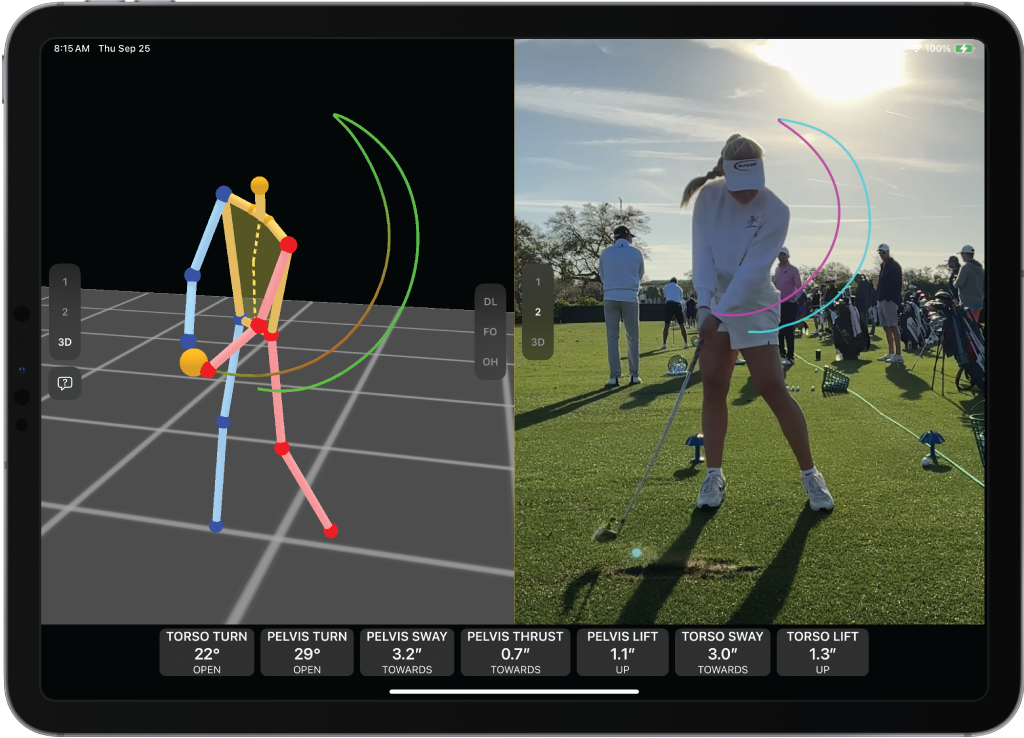
A few months ago, we launched 3D visualizations in Onform, giving you 3D models with slide, sway, and hand path tracking. Coaches and athletes love being able to rotate the 3D model around and see what was really going on. But everyone wanted to know: Where’s the data?
We held off on launching because we wanted to make sure we were accurate, fast, and reliable, and that our solution would work wherever you coach, even offline.
How We Built It
To make sure our data was truly accurate, we even built our own in-house 3D motion capture lab using OptiTrack’s lab-grade optical markered motion capture hardware.
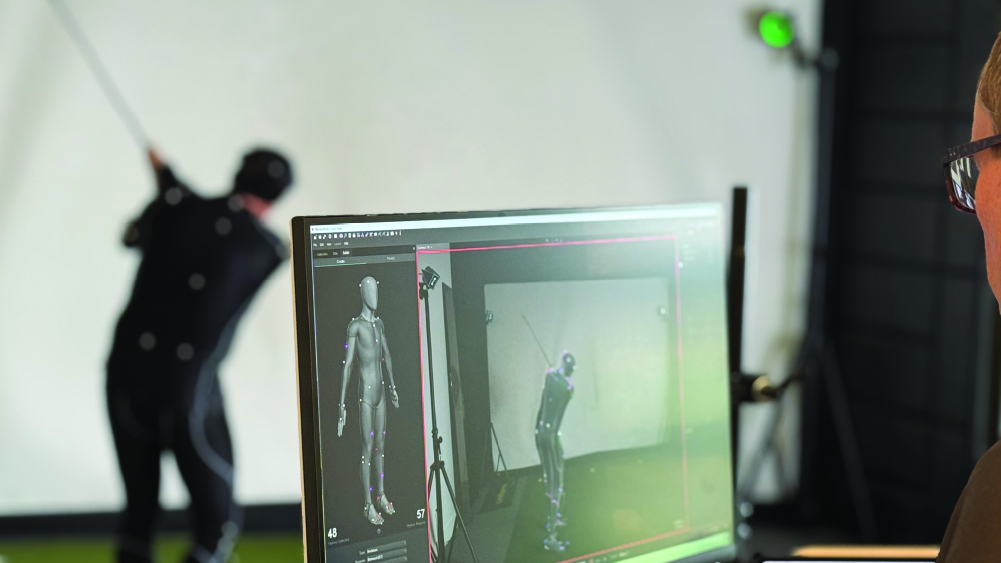
We’ve spent months testing, capturing swings, refining algorithms, and validating results against established electromagnetic (e.g., Polyhemus EMS) and optical markered systems (e.g., Qualisys). Before releasing, we waited until our data lined up with the same metrics used in elite biomechanics research, and we’re continuing to improve with every app release.
We believe the best technology stands up to scrutiny – unlike competitors, we invite you to test it, compare it, and push it to its limits. The more you validate it and provide feedback to us, the better we can refine the model. And to be clear, we don’t use our customers’ data to train our models.
Want to dive into the technical details of our AI models? We are the first company in the golf technology space to publish a comprehensive ‘model card’. This shows our commitment to building world-class AI models and being transparent on its performance, limitations and intended uses.
What Onform 3D Measures
Onform 3D currently tracks 12 core swing metrics including:
(Currently available for swings recorded from the face-on angle.)
- Torso Turn
- Pelvis Turn
- XFactor
- Pelvis Sway
- Pelvis Lift
- Pelvis Thrust
- Torso Sway
- Torso Lift
- Torso Thrust
- Torso Forward Bend
- Torso Side Bend
- Tempo
Coaches Are Already Using It
PGA Master Professional and Onform Ambassador Dr. Alison Curdt is already using Onform’s 3D tools in her lessons, and is already seeing the difference it makes for her and her students. She’s able to show her students exactly what’s happening in their swing without needing complicated setups or lab equipment.
“Onform makes things simple, reliable, and precise, and that’s really important in coaching. Any company can come up with a 3D representation of a body, but is it really accurate? Is it precise? Is it reliable time and time again? That’s really important to me as a coach and Onform certainly does that for me. And the students respect that.” – Dr Alison Curdt
She breaks down how she’s using 3D to fix one of the most common swing flaws in golf: the slice. With Onform, she can spot problems like early hip extension or limited torso rotation in seconds, and coach her students through movement changes that actually stick.
How to Use It
If you’re already recording swings with any of our recording modes: manual, one-tap, auto-detect or multi-cam in Onform, you’re ready to start using 3D. Record a swing as you normally would from the face-on angle (be sure to read our recommendations for recording) and Onform automatically captures and generates the 3D model with accompanied data in the background. Within seconds, you’ll see the fully rotational 3D model with key swing metrics like hip turn, shoulder turn, and tempo across the bottom of the screen.
Webinar
We hosted a live webinar on to show you how to get the most out of Onform’s new 3D features.
You’ll see exactly how the data works, why we built our own in-house 3D lab, and how 3D pairs with tools like multi-cam, the 4-way player, and drawing tools. We’ll also walk through which metrics are available, how to show or hide them, and how to make 3D part of your everyday coaching workflow.
What’s Next:
Onform 3D is currently available on iOS devices for golf, with support for down the line swings and additional sports coming in the future. During the initial launch period, it’s free for all subscribers, so you can start using 3D right away.
Later this year, 3D will become part of a premium subscription package as we continue expanding its capabilities. Our goal is to keep improving based on real feedback from coaches, and to make sure every feature we add is truly beneficial. This is just the beginning, and we’re excited to keep building with your feedback.
Ready to Get Started?
Download Onform from the App Store or Google Play to start your 14-day free trial and begin exploring live coaching with your students.
If you have any questions or want to see how Onform can fit into your coaching business, we’d love to connect. Schedule a call with our team at your convenience.