
Let’s face it – as coaches, we can’t be everywhere at once. It’s hard if not impossible to catch every aspect of an athlete’s swing from different angles. Without a 360-degree view, analyzing the full movement becomes a challenge.
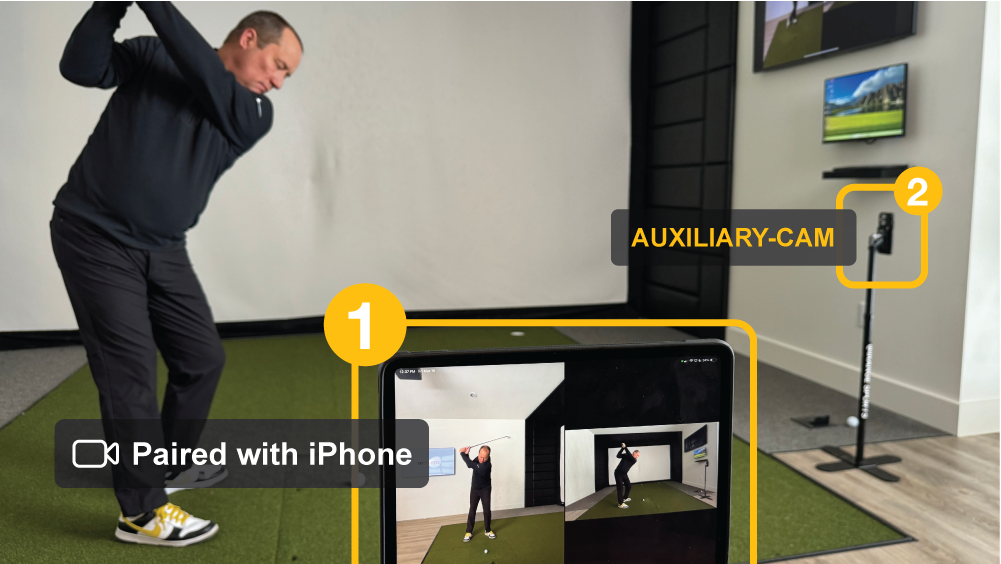
With Multi-Cam recording, coaches can now effortlessly capture multiple angles simultaneously, offering that 360-degree view that was previously impossible. Whether it’s golf, baseball or another technique-based sport, this latest release changes the way coaches and athletes can approach lessons and practice. Multi-cam makes it possible to review video footage from every angle, allowing coaches to make even the smallest tweaks to their athlete’s form.

How to Use Multi-Cam
You can use a second (or third or fourth) iPhone or iPad as an auxiliary camera, wirelessly linked to the primary device. It doesn’t matter whether you’re analyzing a golf or baseball swing, pitch, or any other movement, the immediate side-by-side review gives you a holistic view, enabling you to better analyze your athletes.
Multi-cam will work alongside all of the other popular features in the Onform app, like manual shutterspeed, ultra-wide and telephoto lens choices, and the standard recording modes like ‘manual,’ ‘one-tap,’ ‘auto-detect,’ and ‘launch-monitor.’ This means you’re not just getting multiple angles; you’re getting a complete toolkit for in-depth analysis.
The camera can be controlled remotely from an Apple Watch or a Bluetooth shutter button, and the new auxiliary-cam recording mode transfers videos directly between devices in seconds, enabling real-time, hands-free playback without the need for an internet connection.
But it’s not just for golf and baseball; Multi-Cam will work for any sport, from track & field to gymnastics. Fully wireless, hands-free, and compatible with standard Apple devices, Multi-Cam Recording is more accessible than ever and will change the way coaches use video to record their athletes – whether in the stu
dio, on the range, in the batting cage, or even remotely.
Download the app here to see how easy it is to record and analyze multiple angles all at once! Then, schedule a demo with a member of our team for a personalized onboarding experience.
Check out our support site for detailed how-to instructions, or watch the video below:
Trying to do
The multi view recording for Figure Skating and my two devices are synced but it doesn’t seem to want to work. I went by the instructions above but can’t figure it out. Do you have any suggestions.
Hi Catharine, send us an email at support@onform.com and we’ll be happy to help you out!
Pingback: WEBINAR: What's New in 2025 - Onform