
At Onform, we’re always listening to how coaches use the app. The latest Onform app update delivers several highly requested updates, from text annotations to expanded Pocket Radar support. These new tools came directly from coach feedback and are available now in the latest version of the app.

Add Text Annotations to Video
This is one of our most requested features. For a long time, coaches have been asking for the ability to type directly on video. You already had drawing tools to circle, highlight, and line up angles. Now you can add text too.
With text annotations, you can:
- Label drills or reps during a practice session.
- Add short reminders like “load earlier” or “hold finish.”
- Call out specific positions — for example, “impact” or “release point.”
- Leave clear, simple notes that athletes can rewatch as many times as needed.
It is simple, but powerful. Instead of sending a separate message or hoping athletes remember your words from a live session, the text lives right on the video. It’s straightforward, practical, and makes your feedback impossible to miss.

Pin Messages in Chat
If you’ve ever scrolled through a long chat thread trying to find one key message, you’ll know why this feature matters. Chats with athletes, teams, or even parents can move quickly, and important messages easily get lost.
With pinned messages, you can bookmark one or multiple messages so you don’t lose them. Coaches are already using pins to:
- Save workout plans or practice assignments.
- Keep quick access to session schedules.
- Highlight important feedback that shouldn’t get lost in the conversation.
Pinned messages stay at the top of the thread, so you don’t waste time searching. Everything you need is right where you left it.

Pocket Radar in More Sports
The new Pocket Radar integration has been a game-changer for our baseball and softball coaches. It gives athletes instant velocity data right alongside their video, which makes it easier to connect mechanics with measurable results.
We’ve heard from coaches in many other sports that they want the same ability to capture velocity data with video, so expanded our integration with Pocket Radar into additional sports.
Pocket Radar integration is now enabled for Cricket, American Football, Ice Hockey, Volleyball, Tennis, Lacrosse, Field Hockey, and Soccer. Now you can capture speed data in real time, synced directly with your video.
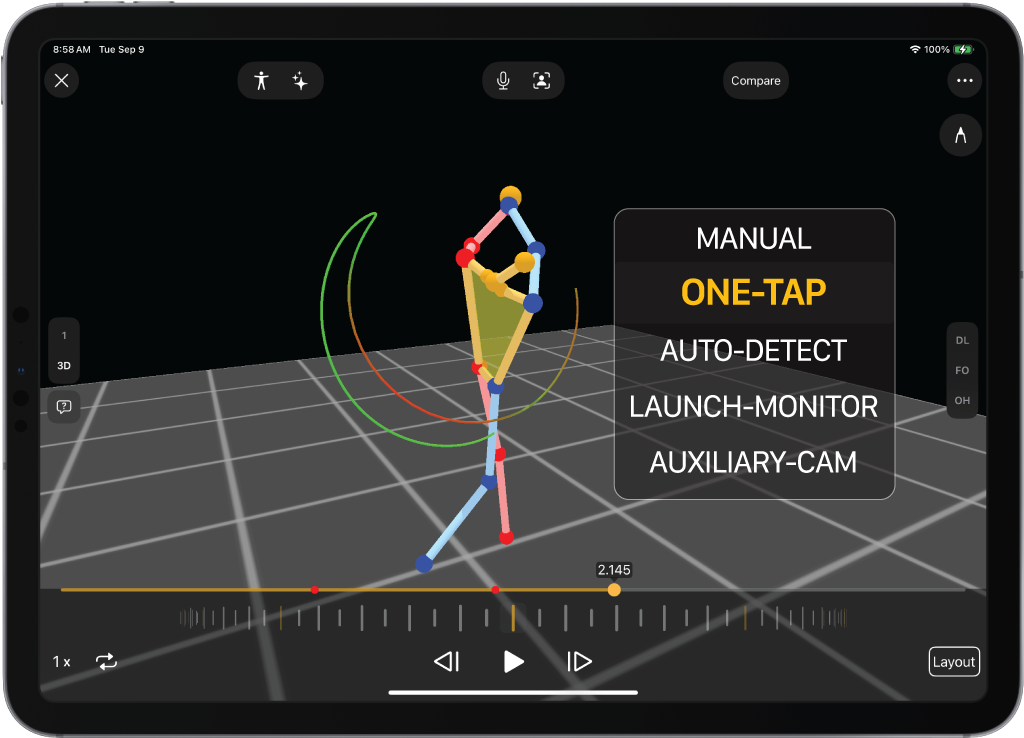
3D Visualization in All Recording Modes
3D Visualization is now available in every recording mode for golf: auto-detect, manual, one-tap, multi-cam, and launch monitor.
Previously, 3D could only be used with auto-detect recordings. Now, any swing you capture can be opened in 3D so you can use whatever recording mode you’d normally record with. The process is fast, simple, and accurate.
Whether you’re capturing a simple one-tap swing or running a multi-cam setup, you’ll get the same clear 3D view to study mechanics and provide feedback.
Update Today
These features were requested by coaches, built for coaches, and are available right now. Update your app today to start using text annotations, pinned messages, 3D visualizations, and expanded Pocket Radar support. If you’d like to speak to a member of the team, schedule a personalized zoom demo.
Using 3D, is it possible to get live numbers of degrees of angle progressively through the swing? As in, how far did the shoulders turn in the back swing and what was the angle of the hips at the same time, and what was the hip and shoulder angle at impact, as an example? Also, any thoughts of creating a more realistic avatar that isn’t a stick figure, but more human-like?
3D data is coming soon!!
can you get the velocity of a sprinter using the pocket radar?
Pocket Radar works best with speeds 25mph or faster, so picking up a sprinter could be difficult unless they were one of the fastest runners in the world. Feel free to email us at support@onform.com with any additional questions!