
Whether you’re a coach helping golfers improve or an athlete working on your own game, recording your golf swing is one of the smartest things you can do. With the right setup and tools, video gives you the kind of feedback that’s hard to get any other way. It makes it easier to spot what’s working, what needs adjustment, and how much progress you’re making.
In this guide, we’ll walk through how to record your golf swing the right way, so you can use that footage to coach smarter, train better, and get results faster. The Onform app gives you everything you need to analyze swings clearly and give high-quality feedback on the spot.
Why Filming Your Swing Matters
For coaches, video helps you teach more effectively. Instead of explaining the same thing over and over, you can show your student exactly what they’re doing, frame by frame. A simple video can reveal things like swing path, balance issues, or how their clubface is moving throughout the swing. That kind of visual feedback is powerful.
For athletes, seeing your own swing helps you understand what’s really happening, especially when it feels different than it looks. You can track progress, fix bad habits, and even compare your swing to pros. Most importantly, you can easily share your videos with a coach, who can provide feedback remotely or between lessons.
Onform makes this process simple. With slow motion playback, voice-over tools, side-by-side comparisons, and drawing tools, you can teach, learn, and improve in one place.
What You Need to Record Your Swing
All you really need is:
- A phone or tablet with a decent camera (we recommend using an iPhone 12 or newer or iPad pro with an M2 chip) running iOS 17 or later.
- A tripod or phone stand (we recommend an iRange stick for portability and stability)
- A few alignment sticks or clubs to mark setup and direction
- The Onform app to record, analyze, and share videos
Step-by-Step: Down-the-Line (DTL) Setup
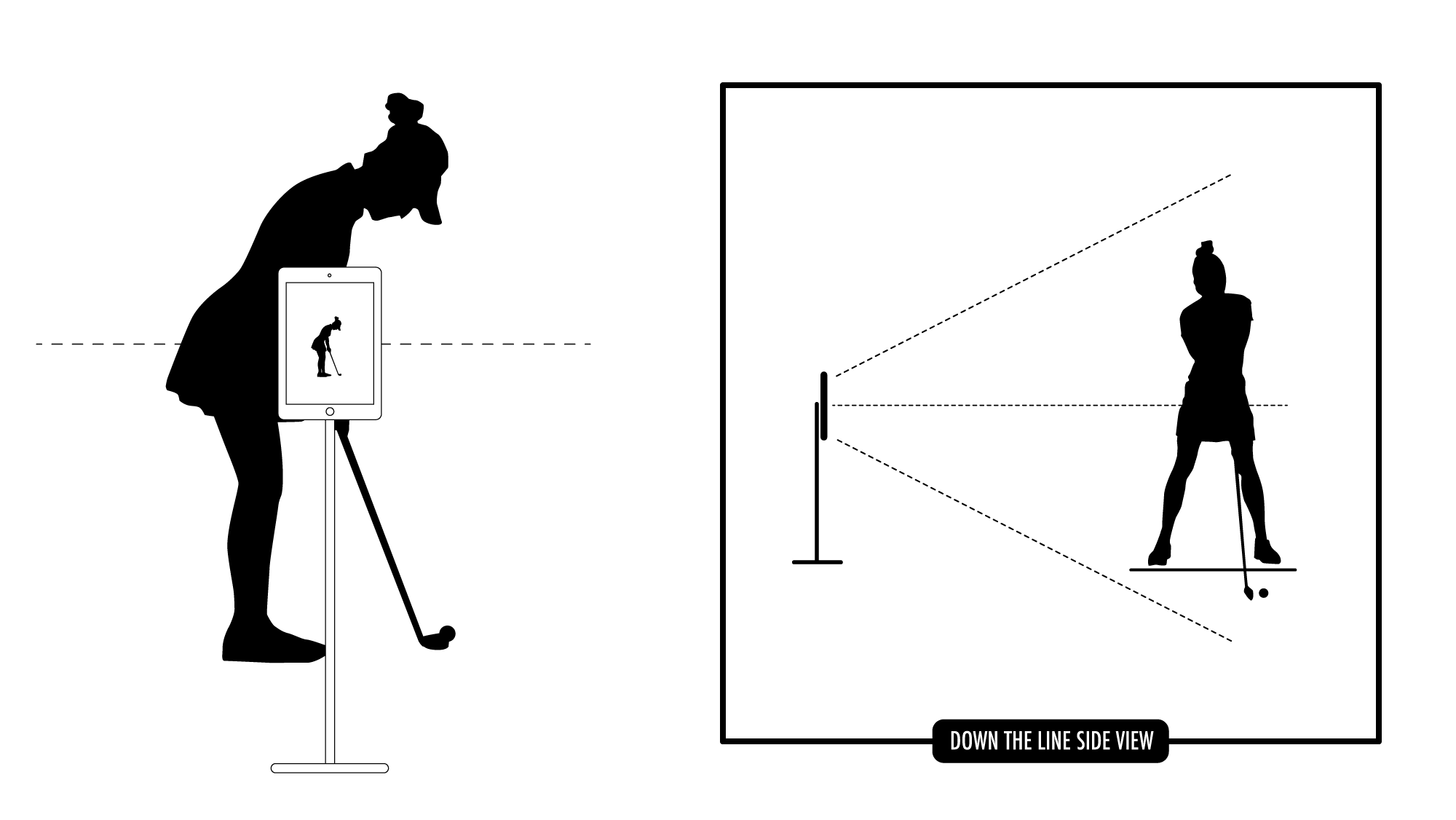
Camera Placement
For down-the-line filming, position the camera height between waist and chest level of the golfer and 10 to 12 feet behind the golfer. The lens should be pointed at the center of the golfer, not the feet or the clubhead. This angle gives you the clearest view of the club path, swing plane, and takeaway.
Use a tripod or iRange stick to hold the phone or iPad steady, especially during practice sessions where you want to review multiple swings.
Use of Alignment Sticks
Alignment sticks help keep setup consistent and make analysis more accurate. Place one stick along the target line to show the intended ball flight direction. For extra detail, add a second stick across the feet to form a T-shape. This helps coaches and athletes check foot alignment and stance consistency.
Framing & Adjustments
Before filming, make sure the entire clubhead stays in frame throughout the swing, from takeaway to follow-through. Use the horizontal line in the Onform app to make sure the camera is level.
Step-by-Step: Face-On (FO) Setup
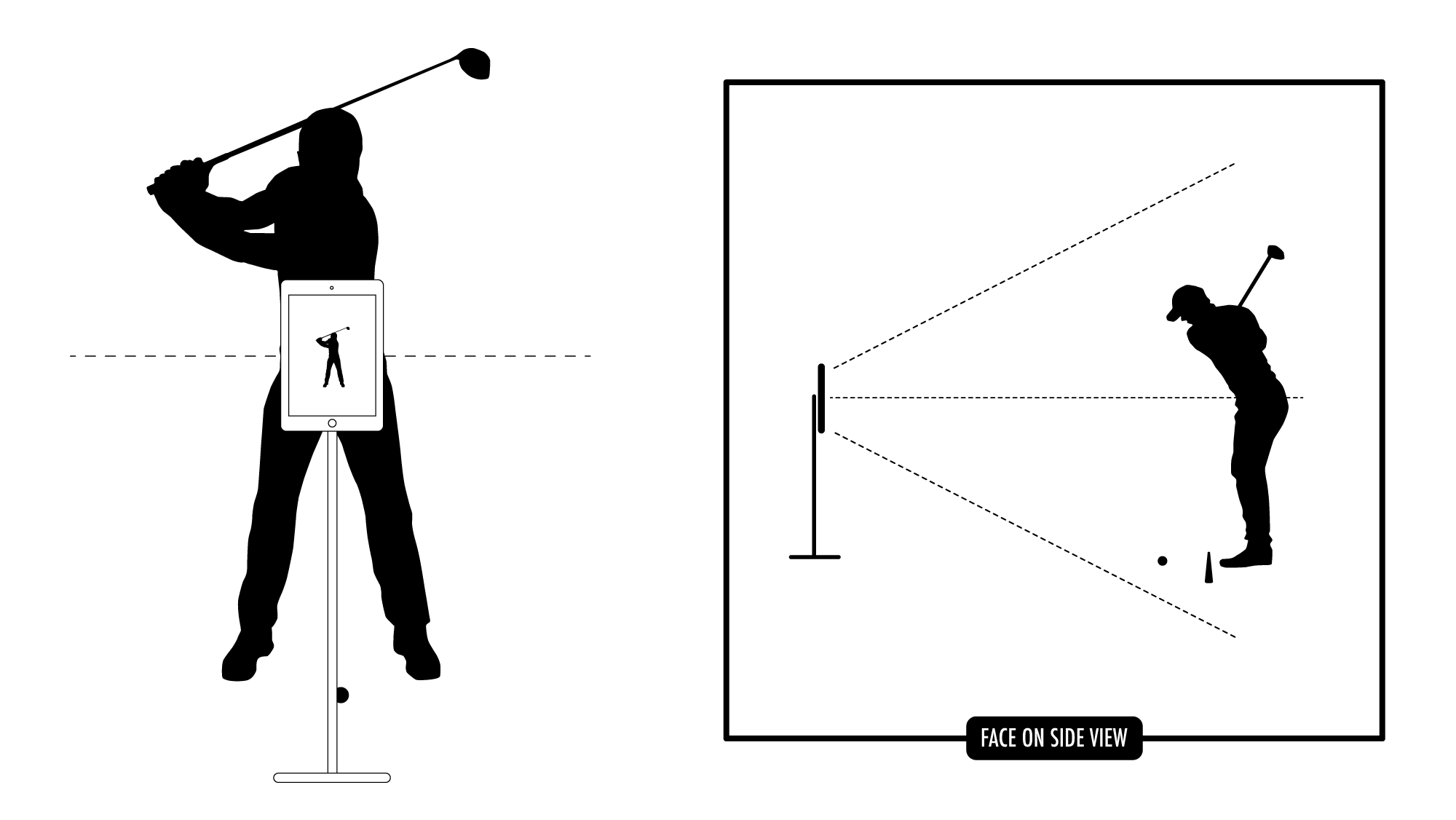
Camera Placement
For the face-on angle, position the camera height between waist and chest level and again 10 to 12 feet in front of the golfer. Make sure the lens is square to the target line and pointed at the center of the golfer, not the player’s chest or feet. This angle is best for viewing weight shift, body rotation, and swing balance.
Framing & Adjustments
Again, check the horizontal line in the Onform app to make sure the camera is level. The goal is to see the entire swing motion, including the takeaway, top of backswing, and full follow-through, without cutting off the club or golfer.
Filming Tips for Best Results
Use Hands-Free Recording
When filming solo, use Onform’s auto-detect recording mode so you don’t have to manually start and stop the camera. Once you step fully into the frame, the Onform app will display a green border and say swing when ready. Onform will automatically capture each swing, clipped perfectly.
Record Multiple Swings
Recording 3 to 5 swings per session helps reveal patterns. For coaches, this provides a clearer picture of what the athlete is doing consistently. For DIY athletes, it gives you a chance to compare swings and spot improvements or areas to work on.
Lighting and Environment
For best results, film in daylight with the sun behind the camera, not behind the golfer. This improves contrast and makes the body, club, and background easier to see. Avoid harsh shadows or cluttered backgrounds that might distract from the swing.
If you’re filming indoors or in lower light, Onform’s manual shutter speed controls help reduce shaft blur. Slowing down the shutter captures each part of the swing more clearly which is especially helpful when analyzing fast movements like downswing or impact.
What to Look for When Reviewing Your Swing
Once the swing is recorded, focus on a few key checkpoints:
- Position at halfway back: Is the club parallel to the ground and on plane?
- Clubface angle and alignment: Is it square, open, or closed during takeaway and at impact?
- Weight shift and balance: Are you transferring weight correctly from backswing to downswing?
- Finish and follow-through: Does the swing end in a balanced, controlled position?
Onform’s frame-by-frame scrubber and drawing tools make it easy to pause, zoom in, and mark angles or positions for clearer feedback.
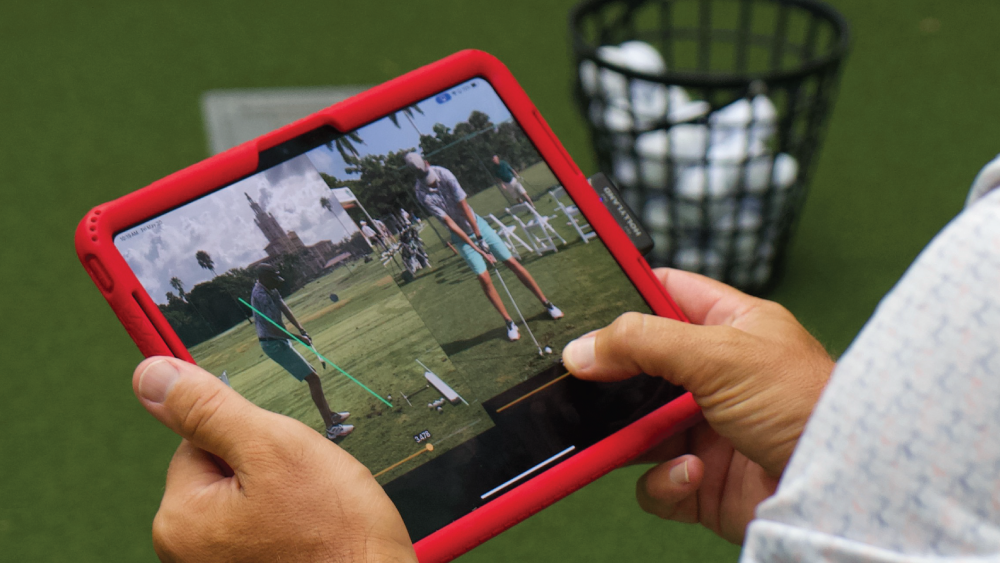
Using Video for Feedback & Improvement
Once you’ve reviewed the swing, it’s time to take action.
- Coaches can send voice-overs or visual feedback directly through Onform, helping their students understand adjustments quickly.
- Athletes can share their videos with a coach, teammate, or online community for input.
- Use Onform’s comparison tools to stack swings side-by-side, overlay swings from different sessions, or compare with a pro model from the reference content library.
- Organize swing videos by club, date, or student using collections and tags in the app.
Using the right filming setup, good lighting, and a tool like Onform makes it easy to coach and train smarter. Whether you’re analyzing a tour-level move or working on a more consistent takeaway, the ability to see and understand what’s happening in each swing is a game-changer.
Ready to start filming your golf swing?
Download Onform, start your 14-day free trial, grab your iRange stick, and start recording better swing videos today.