
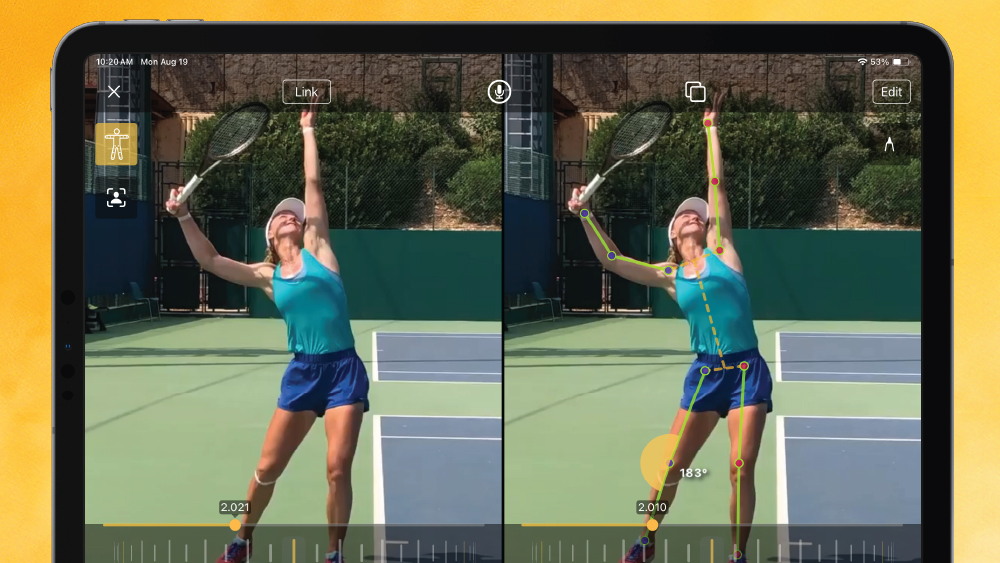
At Onform, we’re always working to make coaching easier and more efficient. Our newest update adds a powerful skeleton tracking tool for joint angle tracking and segment selection. With just a tap, you can switch through different joint angles or turn body segments on or off to get a better view of movement.
The skeleton tracking tool uses AI to overlay a “skeleton” over any video, whether it’s brand new or something you filmed a year ago. You’ll be able to see how the body moves in detail and spot exactly what needs improvement.
NOTE: Skeleton tracking works best when there’s only one person clearly visible in the frame. It may not track accurately if there are multiple people or if the person is blocked by something.
Important Device Info
This feature only works on iPhone XS or newer, or a 2018 iPad Pro or newer. Your device also needs an AI-capable processor, like the A12 chip, M1, or newer.
Why Coaches Will Love Skeleton Tracking
See Movement Clearly
The skeleton overlay helps you see how different joints and the body work together whether the video is playing or paused. It’s great for breaking down athletic movement in any sport.
Works Anytime, Anywhere
No internet? No problem. This feature works offline, and there’s no lag when using it. Just turn it on when you need it and you’re ready to go.
Perfect for Every Sport
Whether you coach golf, track and field, baseball, or any other sport involving human movement, the skeleton tracking tool will work for you.
Compare Movements Side by Side
Want to compare two videos at once? Use side-by-side mode to see movements from different angles. It’s a great way to help athletes make real progress by pointing out subtle differences.
Onform is focused on using tech like computer vision, machine learning, and biomechanics to improve coaching. This update makes it faster and easier to spot problems, track improvement, and help athletes reach their goals faster.
We’re serious about giving coaches tools that actually help. That’s why we keep building features that are smart, easy to use, and actually improve performance.
Try Skeleton Tracking for Yourself
Try it out FREE today and share your experiences with us by tagging @Onform_app in your videos and photos on social media.
Prefer to speak with someone first? Schedule a FREE personalized demo with a member of our sales team.