
When she’s not working with coaches as Onform’s Track & Field Sports Development Representative, Lexie Keller is grinding on the track as one of the top heptathletes in the world. Recently breaking the 6,000-point barrier for the first time, Lexie is currently ranked in the top 10 in the U.S. and top 40 globally.
She’s now preparing to take on the USA Track & Field Championships in Eugene next month. Lexie relies on Onform every day to maximize every rep, stay connected with her coach, and refine technique across the board. In this post, she shares how she uses Onform across all seven heptathlon events, offering an inside look at the tools that help her train smarter, compete stronger, and stay dialed in through every phase of the season.

1. 100m Hurdles – Timing is Everything
In hurdles, it’s all about rhythm, timing, and precision. I use the timer tool to get exact hurdle touchdown times and check if I’m speeding up between each barrier.
With frame-by-frame playback, I can review my start, hurdle clearance, and sprint mechanics down to the split second. It’s especially helpful when I want to compare practice reps with race footage or isolate a technical mistake like hitting a hurdle or reaching too early.

2. High Jump – Take-Off Angles and Rotation
High jump is one of the most technical events in the heptathlon, and it’s where Onform’s angular measurement tool really shines. I look at my takeoff angle, approach steps, and how my shoulders and hips rotate over the bar.
The side-by-side comparison feature lets me study two jumps next to each other to spot small differences between the jumps that cleared the bar versus the ones that didn’t. This helps me spot the small differences in posture or timing that make or break a jump.
3. Shot Put – See it From Every Angle
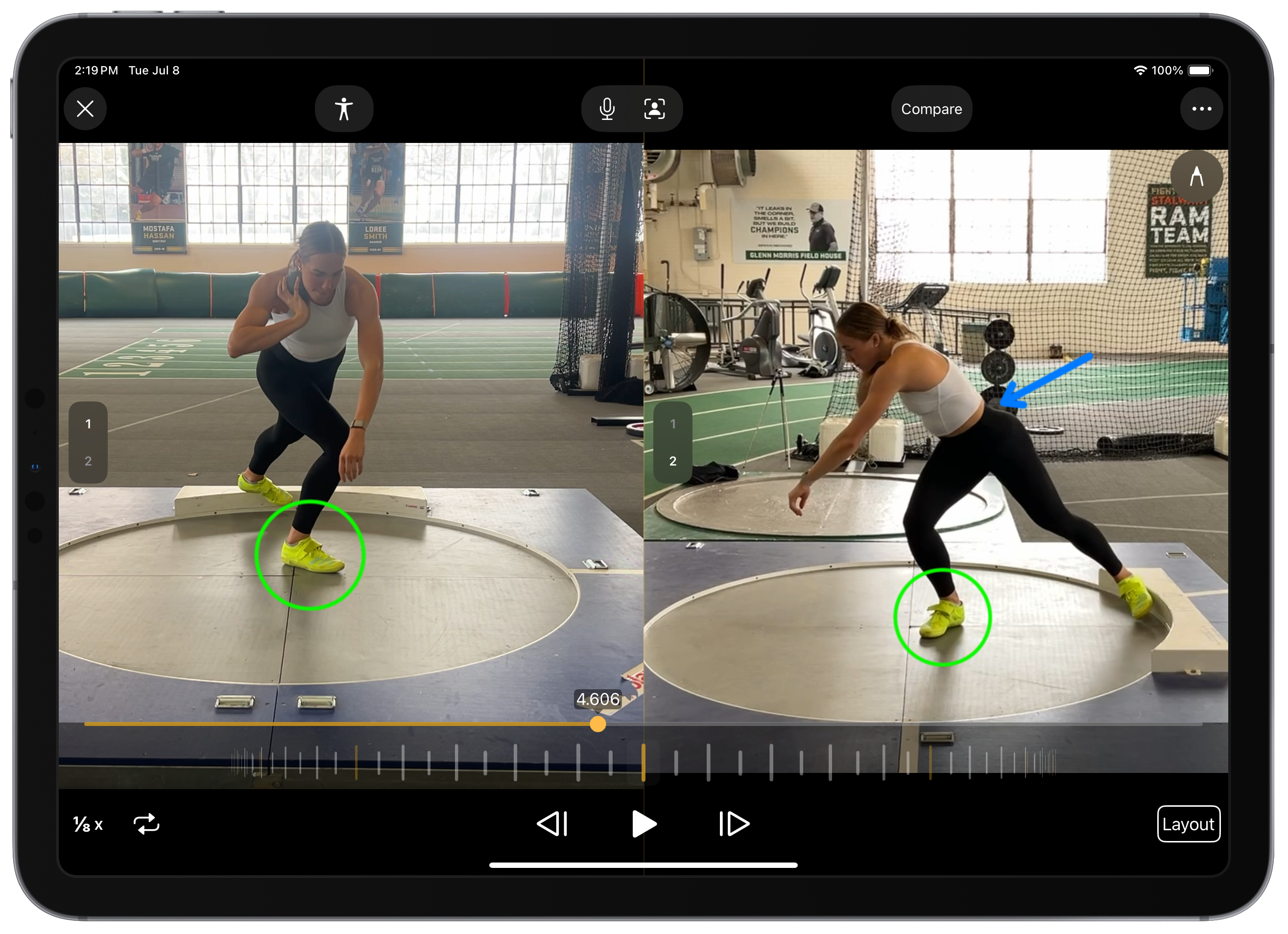
The shot put is fast and technical, and with Onform, I can break down my throws frame-by-frame. A lot of times it feels good or bad, but video gives me the truth. I use multi-angle recording to capture my throws from both the side and back of the ring. Onform syncs up footage from up to 4 devices, so I can get a full view of every phase of my throw, from setup to release.
Then I’ll go in with the markup and angle tools to evaluate my block leg, hip rotation, and the path of the shot. The details matter, and Onform helps me see what I’m doing well and where I’m losing power.
4. 200m – Form, Posture & Precision
The 200m is all about explosive starts and smooth transitions. With Onform’s skeleton tracker tool, I can analyze my posture, head position, arm drive, and body angle out of the blocks. The timer tool also helps track exact sprint rep times during training, which is way more reliable than a hand-timed stopwatch.
5. Long Jump – Locking In Your Approach
There’s no room for error in long jump. One inch on the board can change the outcome of the event. I use Onform to analyze my approach stride-by-stride, especially my checkmark positions and last two steps before takeoff. If I’m reaching or chopping, I’ll catch it in the playback and make adjustments.
6. Javelin – Breaking Down the Details
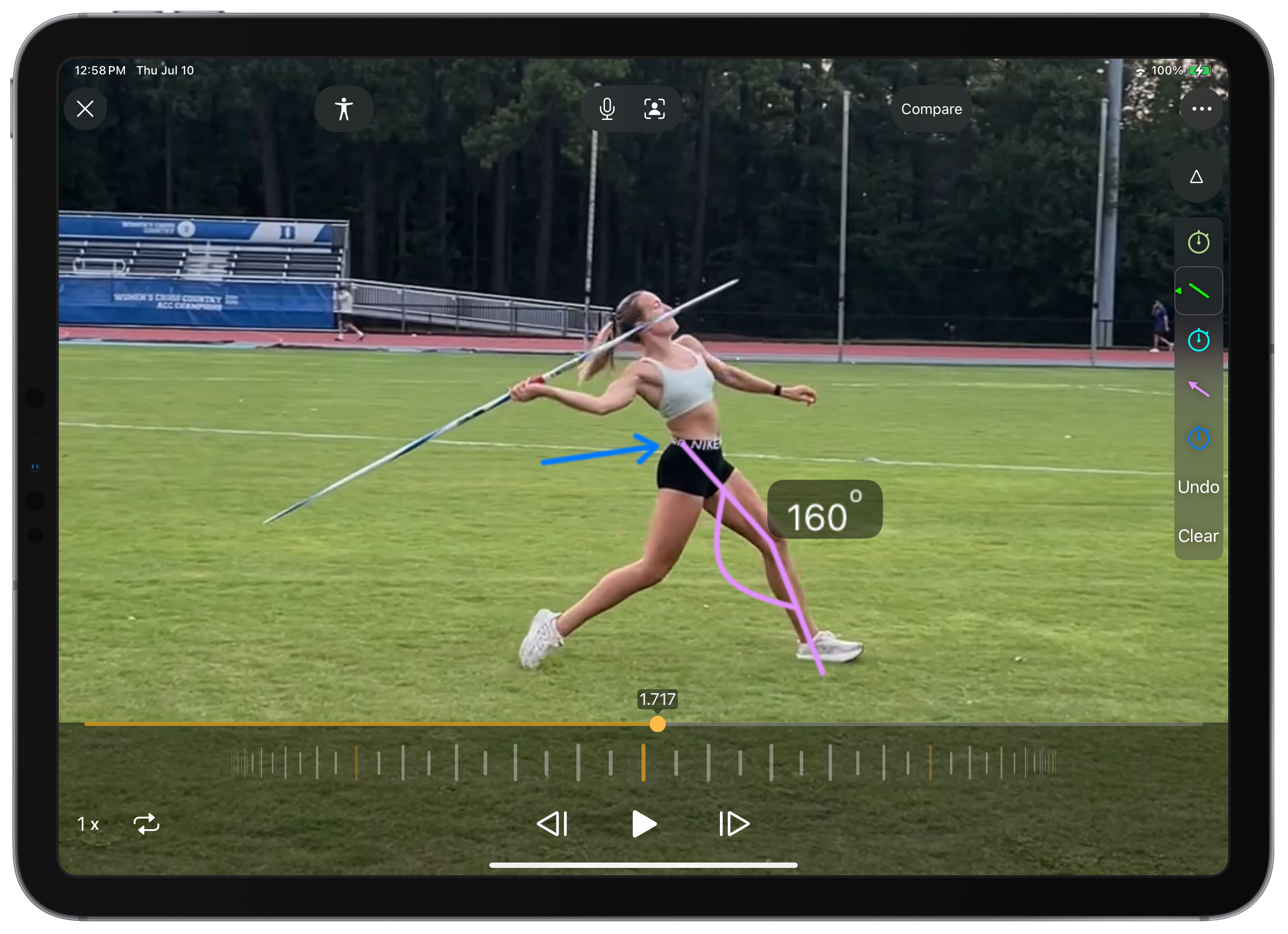
Javelin moves fast, and so much of it depends on subtle angles and separation. I use Onform’s markup and angular tools to evaluate everything from block leg position to release angle of the javelin. This helps me stay consistent, injury-free, and dialed into the fine details that are hard to catch in real time.
7. 800m – Strategy and Storage
The 800m may not be technical in the same way as the other events, but race strategy and pacing are huge. I use the timer tool to break down my 100m/200m splits and learn from each race. That helps me analyze where I’m maintaining pace, surging, or fading.
And practically speaking, Onform automatically stores all videos in the cloud instead of taking up phone storage with long race videos. I just keep them organized inside the app which is super helpful during competition season. During meets, that means I can quickly find and review footage between events or even send it to my coach remotely for instant feedback.
Ready to Get Started?
Download the Onform app to start your 14-day free trial, and schedule a personalized demo with Lexie or another member of the Onform team to help you get onboarded fast.

Training for the heptathlon can feel overwhelming. Seven events means seven different skill sets, techniques, and strategies, before you even factor in travel or recovery. Using Onform helps me stay focused. I can review videos, compare reps, and communicate with my coach whether I’m at practice or across the world. If you’re a multi-event coach or athlete looking for an easier way to watch and learn from training, I can’t recommend it enough.