
Coaching junior golfers is a specialized skill. Most kids don’t understand complex swing mechanics or the metrics that go into them. They thrive on visual learning, drills disguised as fun activities, and communication that doesn’t go over their heads.
Darren McLoughlin, founder of the Darren McLoughlin Golf Academy in Indonesia, focuses on simplicity, engagement and visual feedback rather than heavy technical jargon.
“I try to keep it as simple as possible, make it as relatable and easy to understand as possible,” he said. “With older kids, you can get a bit more into the details, but younger ones you have to make it fun and not something that intimidates them.”
Using Video Analysis and 3D Technology with Juniors
A lot of adult golfers don’t like to see themselves on video. Many are surprised — or even horrified — the first time they see their swing, as the camera shows something different than what the student is feeling.
Junior golfers are different. They actually enjoy seeing themselves swing a golf club, according to Brett Chaffey, a golf instructor at Back Nine Golf in St. George, Utah, who coaches students ages four to 88.
“The juniors love to see the videos,” Chaffey said. “A lot of my younger students will draw the lines for me, and they’re more intuitive that way. They like to see it on video and then help me draw what’s going on.”
In addition to the Full Swing Pro 2.0 golf simulators at Back Nine, Chaffey also uses Onform to record his student’s swings and offer instant feedback.
Onform allows Chaffey and McLoughlin to show the analysis that matters most to juniors and offer easy-to-use features such as on-screen markup tools, providing a hands-on learning experience that leads to real improvement.
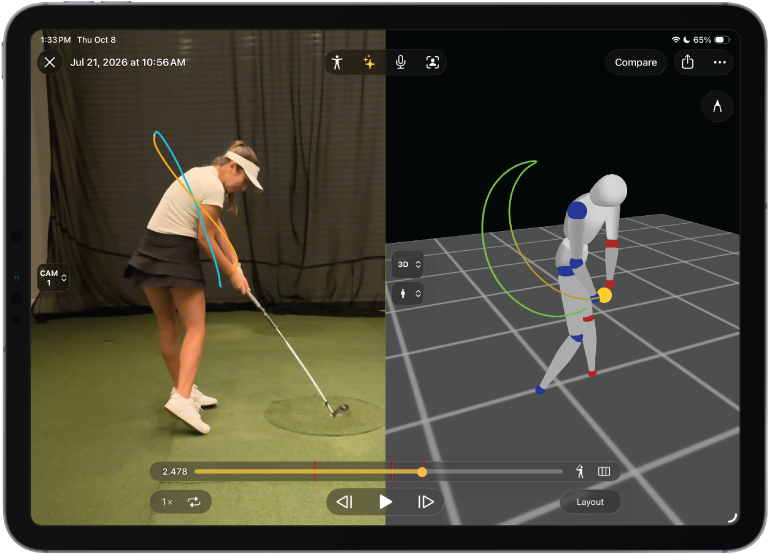
They also are fascinated by 3D swing features, whether it’s the skeleton tracking tool for joint angle tracking and segment selection or the full 3D avatar.
“Nowadays, [juniors] are so involved in AI and technology, they love 3D,” McLoughlin said. “They absolutely adore 3D.”
Chaffey uses the Onform app on an iPad as sort of a smart clipboard, allowing his younger students to use drawing tools to analyze their own swings — with supervision, of course.
“I’ll look over their shoulder and give them prompts or ask questions like ‘Show me where your eyes are looking on your backswing’ or ‘Zoom in on your wrists, what is happening here,’” he explained.
He’ll also use Onform’s comparison tool to superimpose two videos using its overlay mode.
“My students will say, ‘Oh, there’s two of me,’” he said. “It works as a great visual aide for them to easily see the difference from one swing to the next.”
Gamified Drills and Fun Analogies
To encourage proper rotation and movement without heavy-handed technical instruction, McLoughlin — who works with many students ages 6 to 9 — uses relatable concepts and humor. He’ll ask his juniors to name their favorite food.
Sushi is a popular answer to that question.
“I’ll tell them to imagine the target sushi,” he said. “So if you turn and rotate and look at the target, mommy and daddy will buy you sushi.”
He also incorporates silliness to keep them loose, impersonating cartoon characters such as Donald Duck. Anything to “make it fun and make them relax in the hitting bay.”
Another common drill McLoughlin incorporates into his coaching is using chalk lines on the ground, which naturally encourages proper weight shift and dynamics. He’ll use blue for the boys and pink for the girls, telling them, “I don’t want you to hit the ball. I want you to hit the low point line.”
McLoughlin instills realistic mental frameworks early on, reminding young players that mistakes happen and teaching them to measure success through manageable dispersion areas rather than strict distance goals.
“Introducing terms like low point to young golfers is comprehended better when you make it fun and relatable,” he said. “The way I implement it with them, I try to keep it as simple as possible.”
Using Tech with Junior Golfers Creates Marketing Advantages
Young students and their parents can serve as a powerful, organic marketing channel for golf coaches.
McLoughlin recalls several referrals based on word of mouth, with the technology he uses — including 3D features in Onform — as the catalyst for attracting more students to his academy.
When families are out at dinners or social gatherings, parents and their kids proudly share their experience and show off the advanced technology.
“They’ll pull up Onform on their phone or iPad and show their friends their 3D avatars,” he explained. “The friends will say, ‘Wow! That’s so cool,’ and the parents will ask where they train.”
Parents want the best development for their children, and providing advanced tools like 3D visualization as part of standard lessons sets his academy apart from others in Indonesia, making parents eager to recommend McLoughlin to others without the need for formal advertising or referral fees.
“There’s been a few students that have switched coaches to me based on the technology I use,” he said. “It’s all very easy to use and understand, but it comes across as a very premium experience.”